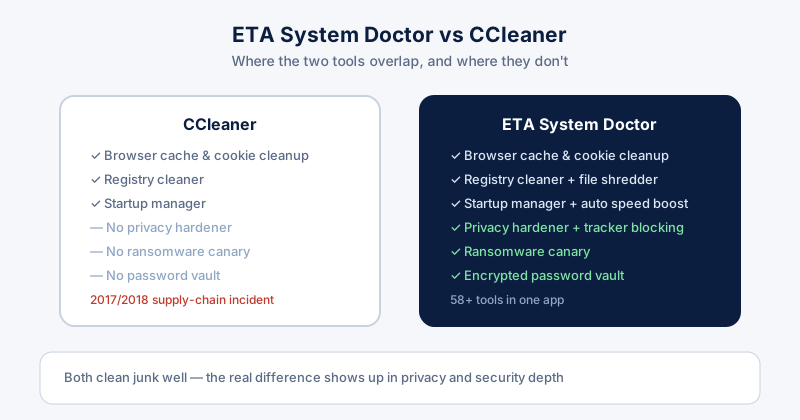
CCleaner has been the default answer to "how do I clean my PC" for two decades. ETA System Doctor is newer and covers more ground. If you're trying to decide which PC cleaner is actually best for you, the honest answer depends on what you want beyond basic junk removal — so here's what each one actually does.
What CCleaner does well
- Browser cache and cookie cleanup across major browsers
- A registry cleaner with a straightforward, familiar interface
- A startup manager for trimming boot-time apps
- A free tier that covers the basics with no cost
It's mature software, and for someone who only wants occasional junk cleanup, it does that job fine.
Where ETA System Doctor goes further
The gap opens up once you look past basic cleanup. ETA System Doctor bundles privacy and security tools that CCleaner simply does not have, rather than expecting you to install and trust separate apps for each one:
- A privacy hardener and browser tracker blocking, not just cookie deletion
- A Ransomware Canary that watches decoy files and alerts the moment encryption starts
- An encrypted local password vault with a built-in generator
- A Fleet Dashboard for checking multiple PCs' health from one browser tab
- 58+ tools total, covering cleanup, performance, privacy, and security in one install
A word about trust: CCleaner's 2017 incident
This is worth mentioning plainly: in 2017, a compromised build of CCleaner shipped with malware baked into the official installer, affecting millions of downloads before it was caught. CCleaner (and its parent company at the time) fixed it and it was years ago — but any tool with this level of system access is worth choosing carefully, and a clean track record matters as much as the feature list.
Free vs paid: what you actually get
Both tools gate their deeper features behind a paid tier — CCleaner's free version covers basic cleanup only, with real-time monitoring and driver updates reserved for Pro. ETA System Doctor's free tier covers browser and Windows cookie cleaning plus an activity log; the Pro tier is where the privacy hardener, ransomware canary, and password vault unlock.
So, which PC cleaner is best for you?
If all you ever do is clear a cache and trim your startup list, either tool gets you there. If you want privacy protection, ransomware detection, and password management without installing and trusting three or four separate apps, ETA System Doctor covers more of that ground in one place — which is the whole reason it exists.