A gaming PC accumulates cached data faster than almost anything else. Steam, Epic, and the graphics driver each keep their own store, and a few years of use can add up to tens of gigabytes of disk space. Some of it is safe to delete; some of it will cost you a re-download or a stuttery first hour. Knowing which is which is most of what a game cache cleaner on PC actually does for you.
Shader caches
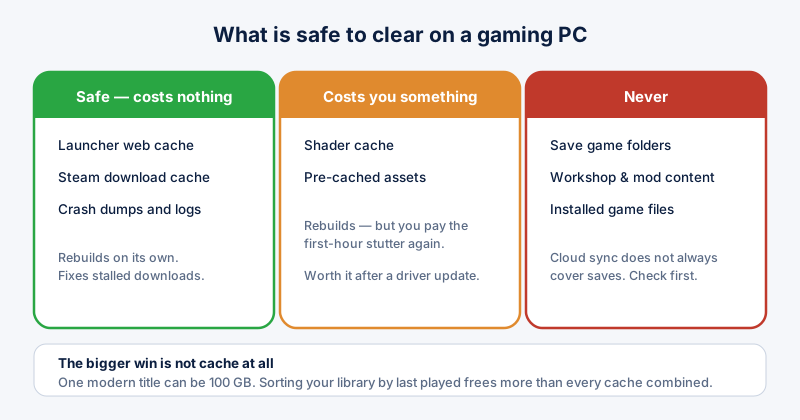
Modern games compile shaders for your specific GPU and cache the results. This is why a game can stutter during its first hour and run smoothly afterwards. The cache is safe to delete and will rebuild automatically — but you will pay that stutter again.
Worth clearing after a driver update, when stale entries can cause visual glitches. Not worth clearing routinely.
Steam download cache
Steam keeps partially downloaded and staged update data. When downloads stall or repeatedly fail to verify, clearing this cache is the standard fix. In Steam, open Settings, then Downloads, then Clear Download Cache. It signs you out and costs you nothing else.
Launcher web caches
Steam, Epic, and similar launchers embed a browser for their store pages, and it caches like any browser. This one is genuinely just clutter — deleting it costs you nothing but a slightly slower store page next time.
What not to delete
- Save game folders — some games store saves alongside cached data, and cloud sync does not always cover everything. Check before clearing anything inside a game's own directory.
- Workshop and mod content — deleting it means re-downloading and, for some games, reconfiguring load orders by hand.
- Installed game files themselves — "clearing cache" tools that offer to remove these are offering to uninstall your games.
If a folder's purpose is not obvious, rename it rather than deleting it, then launch the game. If nothing breaks, delete the renamed folder later. This costs a minute and has saved a lot of people their save files.
The bigger win: old games
Caches are usually not where the space went. A single modern title can occupy 100 GB or more, and most libraries contain several installed games nobody has opened in a year. Sorting your library by last played, and uninstalling what you have finished, frees more than every cache combined — and your saves and progress stay in the cloud.
ETA System Doctor's Game & App Cache tool covers Steam, Epic, and Discord together and shows what each will free before removing anything, so you can decide item by item rather than trusting a single button.