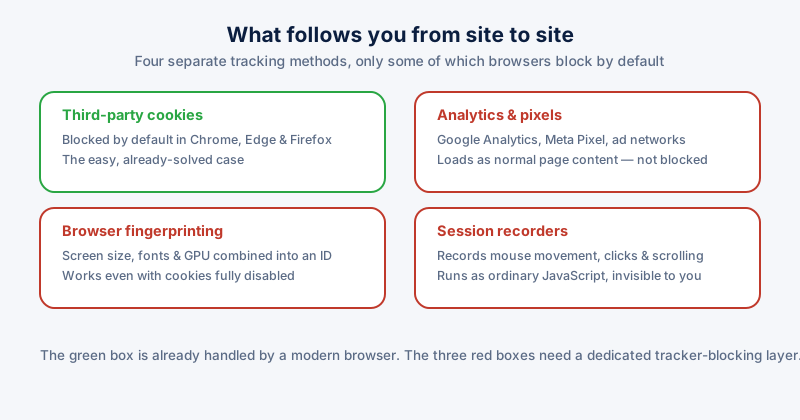
Chrome, Edge, and Firefox all block third-party cookies by default now, which solves the tracking method most people picture when they hear the word. It also creates a false sense that the problem is handled. Three other tracking methods run on almost every commercial site and none of them are stopped by a browser's default settings.
How trackers actually work now
Analytics platforms and ad networks load as ordinary page content — a script tag pointed at a tracking domain, indistinguishable at a glance from any other resource the page needs to function. Browsers cannot block them by default without breaking sites that rely on the same scripts for legitimate features, so this category is left almost entirely to the user.
What built-in protection misses
- Analytics & pixels — Google Analytics, Meta Pixel, and similar scripts embedded directly in page content, loading as normal resources
- Fingerprinting — combining screen resolution, installed fonts, and GPU details into an identifier that survives even with cookies fully disabled
- Session recorders — third-party scripts that log every mouse movement, click, and scroll on a page, running invisibly in the background
A practical blocking checklist
- Confirm third-party cookie blocking is on in your browser's privacy settings — it usually is by default, but worth checking after any reset.
- Add a dedicated tracker-blocking layer that filters known analytics, ad, and fingerprinting domains at the network level, not just cookies.
- Avoid stacking multiple overlapping blocklist extensions — they frequently conflict and break legitimate site functionality like checkout forms.
- Check periodically that blocking a tracker hasn't silently broken a site you rely on, and allow-list it if so.
Aggressive, unmaintained blocklists are the most common cause of "this site is broken" reports — when a page misbehaves right after installing a blocker, that's the first thing to suspect.
ETA System Doctor's Browser Guard extension blocks the analytics, fingerprinting, and session-recording networks that third-party cookie blocking never touched — Google Analytics, Meta Pixel, session recorders and more — filtered at the network level so it keeps working even against trackers that don't use cookies at all.