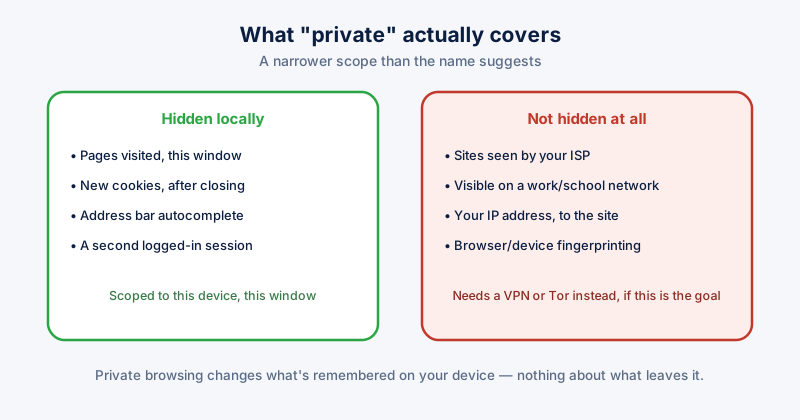
"Private" in the name does more to shape expectations than the feature itself does. Incognito (Chrome), InPrivate (Edge), and Private Browsing (Firefox) all work the same basic way, and all three protect against a narrower set of things than most people assume.
What it actually does
- Doesn't save the pages you visit to local browsing history
- Doesn't save new cookies once the private window is closed — so sites won't remember you were logged in or what was in your cart, next time
- Doesn't save what you typed into the address bar to autocomplete suggestions
- Lets you sign into a second account on a site alongside your normal logged-in session in a regular window
What it does not do
This is the part the name doesn't convey, and it's the more important half of the picture:
- Your network can still see where you go. Your internet provider, and your employer or school if you're on their network, sees the sites you connect to regardless of the browser window's privacy mode. Private browsing operates entirely on your own device — it changes nothing about what leaves it.
- Websites can still track you during the session. A private window gets a fresh, empty cookie jar, but sites can still see your IP address, and other tracking techniques (device and browser fingerprinting in particular) work whether or not you're in a private window.
- Downloads and bookmarks are not automatically deleted. Anything you explicitly save stays saved after the window closes.
- It provides no protection from malware you might download or a phishing site you might land on — private mode changes what's remembered locally, not what's dangerous.
If the goal is hiding browsing activity from your network provider or workplace, that's a different tool entirely — a VPN or Tor — not private browsing mode. They solve different problems and it's worth being clear on which one you actually need.
Getting the most out of it for what it's actually good at
- Use it for shared or borrowed devices, so your history and logins aren't left behind for the next person
- Use it to test a site logged out, or as a second account, without touching your normal session's cookies
- Close the private window fully when done — the privacy benefit for that session ends once it's closed, and history from before you opened it is untouched either way
- Combine it with a VPN if network-level privacy from your ISP or network operator is actually the goal
The gap most people miss entirely
Private browsing only protects sessions that happen inside a private window. Everything from your regular, day-to-day browsing — years of history, cookies, and saved site data in your normal windows — sits on disk exactly as it always has, unaffected by ever having opened a private window at all. Treating private mode as a substitute for actually managing that everyday data is the most common way people end up with a false sense of how private their browsing history really is.
ETA System Doctor's Browser Cleanup and per-site cookie controls handle that everyday layer — clearing history, cache, and cookies from your normal browsing on a schedule you set, across every browser you use, so private windows aren't doing double duty as your only privacy habit.