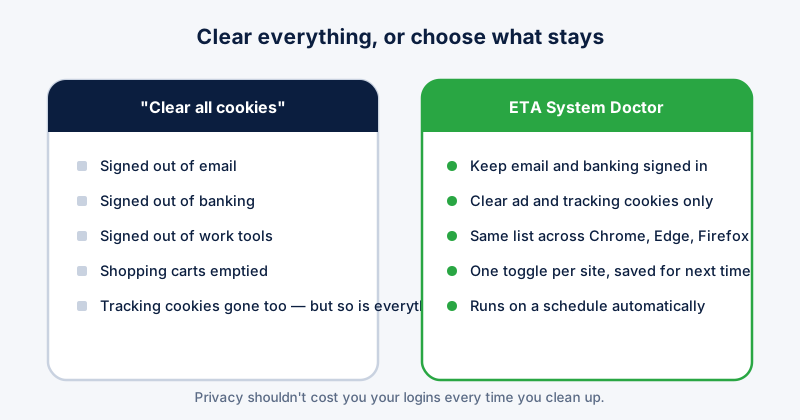
The standard advice for cleaning up cookies is "clear all cookies", and the standard result is being signed out of your email, your bank, and every site you use daily, all at once. A per-site cookie cleaner solves the actual problem: removing the tracking and ad cookies you don't want while leaving the logins you do want alone.
Why "clear all" is the wrong tool
Chrome's Clear browsing data dialog treats every cookie the same, whether it's an ad network following you across the web or your bank keeping you signed in. There is no way, from that one dialog, to keep one and remove the other — it's all or nothing.
Doing it manually, site by site
- In Chrome, go to chrome://settings/content/all — this lists every site holding data, largest first.
- Click a site to see what it's storing, and use the trash icon to remove just that one.
- Repeat for Edge (edge://settings/content/all) and Firefox (about:preferences#privacy, "Manage Data") separately — each browser keeps its own list.
- Do this again in a few weeks, because the list refills as you browse.
This works, but it is entirely manual, has to be repeated in every browser you use, and has to be done again and again as new sites add cookies. ETA System Doctor's Browser Cleanup does this automatically across Chrome, Edge, and Firefox in one pass — clearing tracking and ad cookies while keeping the sites you choose signed in, on a schedule, without you opening three separate settings pages every time.
What to keep vs. what to clear
- Keep: email, banking, work tools, anything you'd be annoyed to sign into again
- Clear: ad networks, analytics trackers, sites you visited once and never returned to
- When unsure: check the domain — if you don't recognise it, it's almost always a tracker riding along with a page you visited, not a site you deliberately signed into
Why this matters beyond convenience
Tracking cookies are how advertising networks build a profile of your browsing across sites you never gave permission to be tracked on individually. Clearing all cookies removes them, but at the cost of your logins too — which is exactly why most people give up on cookie hygiene after the first time it logs them out of everything.
The actual fix is per-site control, applied automatically. ETA System Doctor's Browser Cleanup lets you mark the sites you want to stay signed into once, then handles the rest on its own — every browser, on a schedule, without the all-or-nothing trade-off that makes "clear all cookies" advice so painful to actually follow. That's the difference between a privacy habit you keep doing and one you abandon after the first login you lose.