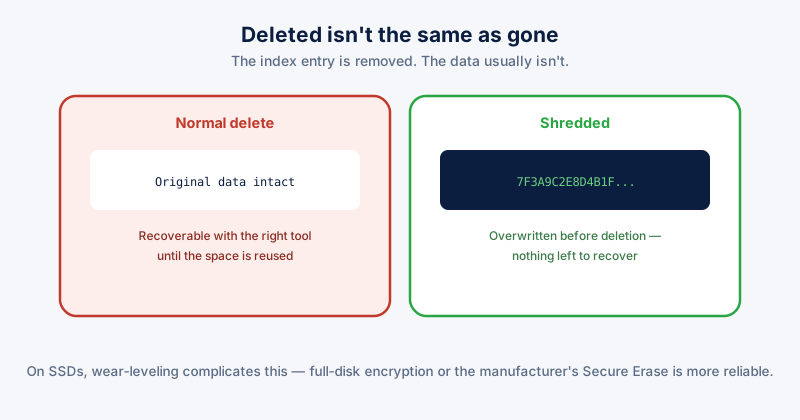
Deleting a file, even emptying the Recycle Bin afterward, doesn't erase the data sitting on the drive. It removes the file system's record of where that data is, marking the space as available for something new to be written there eventually. Until something actually overwrites that space, the original data is still physically present and recoverable with the right tool.
What actually happens on delete
Think of a drive's file table as a book's index rather than the pages themselves. Deleting a file tears out the index entry, not the pages — the content stays exactly where it was until the space gets reused for something else, which might happen in seconds or might not happen for months, depending entirely on how full the drive is and how much new data gets written afterward.
This is why free "file recovery" tools exist and genuinely work for accidentally deleted files — they're reading data that was never actually erased, just marked as available. The same mechanism that makes accidental-deletion recovery possible is exactly what makes ordinary deletion insufficient for something you deliberately want gone for good.
What shredding does differently
File shredding overwrites the actual data on disk — typically multiple passes of random or specific bit patterns — before removing the file reference, so there's no original data left sitting in that space for a recovery tool to find. The file system entry is gone the same way as a normal deletion, but the underlying content genuinely isn't there anymore, rather than just being unreferenced.
When this actually matters
- Before selling, donating, or recycling a PC or drive — anything left on it via normal deletion is potentially recoverable by whoever gets it next
- Financial documents, tax records, and anything with account numbers — files you're genuinely done with and don't want recoverable if the drive is ever lost, stolen, or improperly disposed of
- Work documents under confidentiality obligations once a project ends and retention requirements are satisfied
An important caveat for SSDs
Traditional multi-pass overwriting was designed for spinning hard drives. SSDs use wear-leveling — the drive's controller spreads writes across different physical cells than where the logical address says the data "is," specifically to extend the drive's lifespan — which means a shredding tool telling the OS to overwrite a specific file's location doesn't reliably reach the same physical cells the original data occupied. For SSDs specifically, full-disk encryption from the start (so anything ever written is already unreadable without the key) or the drive manufacturer's own Secure Erase utility are more reliable than file-level shredding software.
The practical takeaway
Normal deletion is fine for the overwhelming majority of files — there's no realistic threat model where someone recovers your average deleted document. Shredding matters specifically for files you're deliberately removing because their content would be a genuine problem if recovered, and it's worth knowing the SSD caveat above before assuming a shredding tool alone is sufficient on modern hardware.
ETA System Doctor's File Shredder overwrites files before deletion for exactly this use case, and its "Shred with ETA System Doctor" right-click option in Explorer means reaching for it doesn't require opening the app first for a file you want gone the moment you're looking at it.