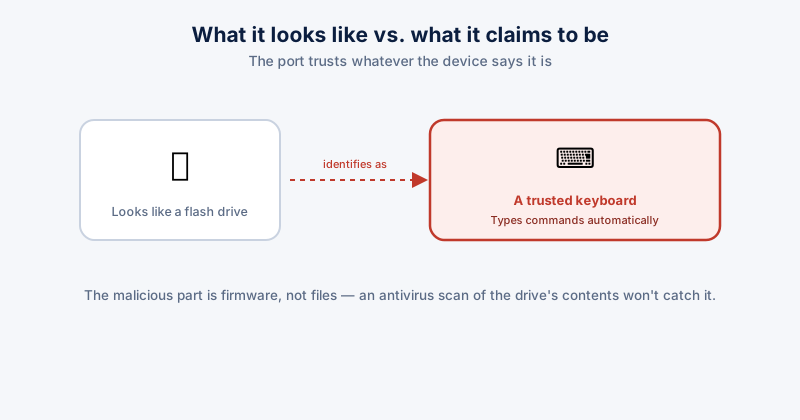
A USB port doesn't inherently know or care what kind of device just got plugged into it. A flash drive, a keyboard, and a mouse are all just USB devices that identify themselves to the computer on connection — and a malicious device can identify itself as a keyboard while looking, physically, exactly like an ordinary flash drive.
How a malicious USB device actually works
This class of attack (commonly called BadUSB) reprograms a USB device's own firmware — not the files stored on it, but the controller chip that tells the computer what kind of device it is. The computer sees what claims to be a keyboard, trusts it the same way it trusts any keyboard, and the device then "types" a pre-programmed sequence of keystrokes automatically the instant it's plugged in — fast enough to open a command prompt and run something before a person could realistically intervene.
Because this attack lives in the device's firmware rather than in files on it, a standard antivirus scan of the drive's contents won't catch it — there's nothing malicious in the file system to find. The malicious behavior is the device identifying itself as a different, trusted type of hardware.
Where this risk actually comes from
- A USB drive found lying around — in a parking lot, a lobby, left in a meeting room — deliberately left as bait is a documented, real social engineering tactic, not just a theoretical scenario
- A drive borrowed from someone you don't know well, or a public/shared computer's USB port used for charging (public charging cables and kiosks carry a related but distinct risk)
- A promotional USB drive handed out at an event by an unfamiliar source
Reducing the risk
- Don't plug in a USB device you found, weren't expecting, or received from a source you don't fully trust — this single habit closes off the large majority of the realistic risk
- If you must inspect an unknown drive's contents, use a machine that isn't connected to anything sensitive and isn't your primary device — a spare, or a virtual machine specifically for this purpose
- Windows' AutoPlay/AutoRun being disabled (the default on modern Windows) already blocks the older, simpler version of this attack that relied on a drive auto-executing a program — the keystroke-injection version doesn't need AutoRun and isn't stopped by it, which is why device-level caution still matters
- For organizations with a real exposure to this (shared workspaces, public-facing reception areas), USB port-blocking policies on sensitive machines are a legitimate control, not overkill
ETA System Doctor's New USB Device Alert notifies you the moment a new USB storage device is connected, giving you a chance to notice and react to a device you didn't expect being plugged in, rather than it going unnoticed in the background.