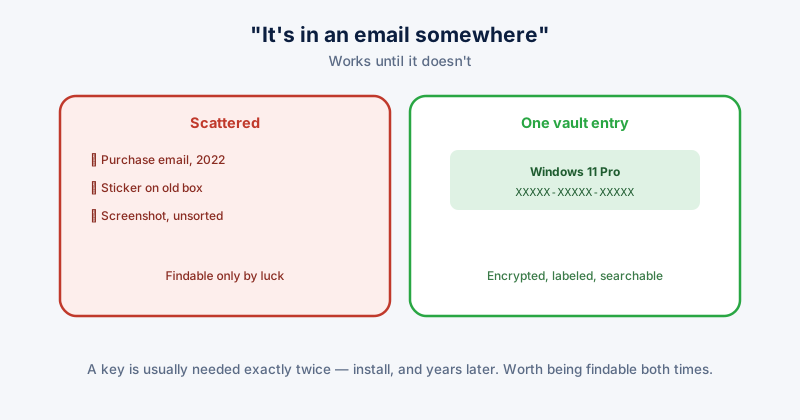
A software license key is usually needed exactly twice: once at install, and once much later — reinstalling after a PC replacement, recovering from a crash, or moving a license to new hardware — at which point it's either sitting somewhere findable or it's gone. Most people's actual storage strategy is "it's in an email somewhere," which works until the email account changes, the message gets archived past where search finds it, or years pass and the exact search terms are forgotten.
Where keys tend to get lost
- A purchase confirmation email, in an inbox that's since been migrated, filtered, or simply has thousands of messages between then and now
- A sticker on physical packaging for boxed software or a game, for hardware or software bought years ago and long since put away
- A screenshot or photo taken "just in case" and never organized anywhere findable again
- Nowhere at all — some keys are only ever seen once during activation and never deliberately saved
Finding keys already installed on your PC
For software already activated on the machine you're currently using, the key is sometimes retrievable directly rather than needing the original purchase record at all:
- Windows itself: the product key is embedded in the system firmware on most PCs that came with Windows pre-installed, and Windows activates automatically using it — you generally don't need the key at all for a reinstall on the same hardware, though having it recorded is still useful for reference
- Third-party key-finder tools can read activation keys for many installed applications directly from the Windows registry, for software still installed and activated on the machine
Where to keep them going forward
- A password manager or encrypted vault, treated the same as a password — searchable, backed up, and not dependent on a specific email account staying accessible forever
- One consistent location, not scattered across whichever app happened to be open when you bought the software
- Labeled clearly enough that a search for the software name actually finds it — "Windows 11 Pro key" rather than just pasting the key with no context
Avoid a plain, unencrypted text file or spreadsheet as the only copy — it's convenient until the device it's on is lost, stolen, or wiped, at which point every key in it is gone along with it (or worse, exposed to whoever gets the device next).
A quick audit worth doing
For any software or game you'd be genuinely inconvenienced to lose access to, check right now whether you could actually find its license key within a minute. If the honest answer involves "probably in an old email, somewhere," that's worth fixing before it's actually needed under time pressure.
ETA System Doctor's Software License Key Vault gives license keys a dedicated, encrypted place right alongside your Password Vault, so a reinstall months or years later means opening one app rather than searching an inbox.